Babyface Pro FS: connection and audio troubleshooting
Model: Babyface Pro FS
- Distinguish Pro FS from older Babyface models. Feed DJ left/right into separate LINE-capable inputs; for AN 3/4 verify side-input reference levels in the manual.
- Check the corresponding top-row Hardware Input meters in TotalMix. If silent, investigate cable and input level first.
- Select the same stereo input numbers in the recorder. Audible TotalMix monitoring does not prove those inputs are selected in the app.
- Software Playback and Hardware Outputs are separate rows; distinguish the speaker submix from recording input selection.
- For doubled monitoring compare direct and application paths separately. Enable Loopback only with a clear route and avoid feedback loops.
Explore specific symptoms
- Recording is silent or unavailable
- No DJ audio in OBS or a stream
- Only one side plays
- Delay or doubled audio
Official source and scope
Babyface Pro FS — manufacturer documentation
Documentation reviewed 2026-10-18. Settings vary by OS, software and driver release. Hardware outcomes are unverified.
Read validation scopeReviewed ports for this model
- Output
- XLR L/R (two channels) · ANALOG OUT 1/2 · XLR
- Input
- 6.35 mm jack L/R (two channels) · ANALOG IN 3/4 · 6.35 mm
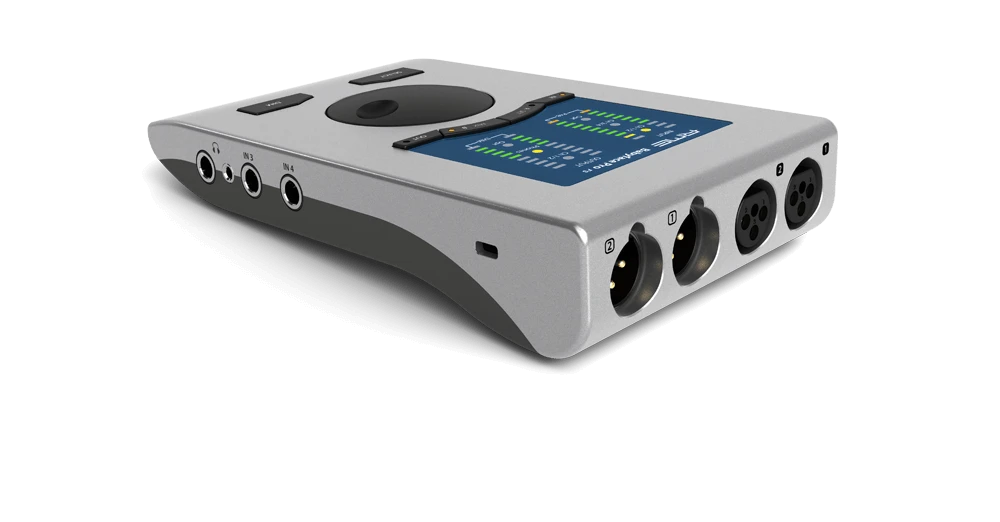
This table describes representative paths registered for the stereo analog guide, not all ports, USB/digital functions or OS compatibility.