Choosing tracks by key: Camelot chart and easy-to-mix pairs
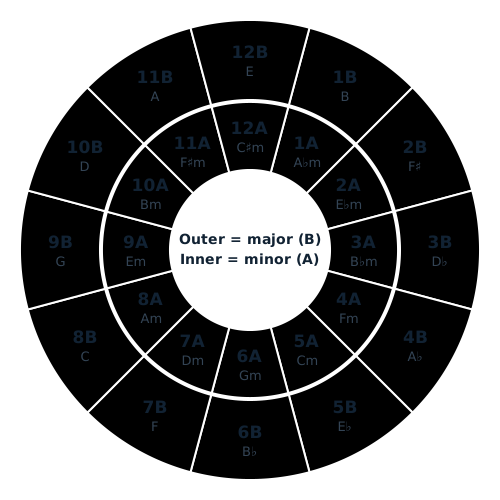
Every track has a key, the centre of its pitch. Tracks with close keys clash less when overlapped. The Camelot chart labels the 24 keys with a number and A/B as a quick guide.
Flow
- Read the track key in your software
- Shortlist tracks with close keys
- Overlap in headphones (ears decide)
Steps
- A key is like the pitch of a singing voice. Two singers in different keys sound off together, and so do two tracks.
- Show the key in your software. The display style (note names like C or Am, or number plus A/B) differs by software. This chart uses number plus A/B.
- Pick the next track from the key of the current one. The easy ones are the same number and letter (8A → 8A), one number away (8A → 7A or 9A), and the same number with A and B switched (8A → 8B).
- When unsure, keep the overlap short. Mixing at a break or on rhythm only is safer even if the keys differ.
- The chart is only a guide. Overlap in headphones and choose another track if it clashes. Software key detection can also be wrong for some tracks.
Easy pairs
- Same number and letter: 8A → 8A (same key)
- One number away, same letter: 8A → 7A or 9A
- Same number, switch letter: 8A → 8B (minor and major swapped)
- Advanced: going up two numbers (8A → 10A) is said to lift the energy. It is a matter of taste, so check by ear.
Camelot chart (24 keys)
| Camelot | Open Key | Key | Camelot | Open Key | Key |
|---|---|---|---|---|---|
| 1A | 6m | A♭m | 1B | 6d | B |
| 2A | 7m | E♭m | 2B | 7d | F♯ |
| 3A | 8m | B♭m | 3B | 8d | D♭ |
| 4A | 9m | Fm | 4B | 9d | A♭ |
| 5A | 10m | Cm | 5B | 10d | E♭ |
| 6A | 11m | Gm | 6B | 11d | B♭ |
| 7A | 12m | Dm | 7B | 12d | F |
| 8A | 1m | Am | 8B | 1d | C |
| 9A | 2m | Em | 9B | 2d | G |
| 10A | 3m | Bm | 10B | 3d | D |
| 11A | 4m | F♯m | 11B | 4d | A |
| 12A | 5m | C♯m | 12B | 5d | E |
A is minor (m), B is major. Sharps and flats can be written either way (for example F♯ and G♭). Open Key uses the Camelot number minus 7 (8A → 1m, 8B → 1d); d is major and m is minor.
Software: how to change the key display (official documents)
- rekordbox: Preferences > View > Key display format; choose Classic (note names such as Abm, B, Ebm) or Alphanumeric (1A, 1B, 2A and so on). The AlphaTheta FAQ describes rekordbox 5.4.3 or later; check that your version uses the same names.
- Serato DJ Pro: "Show Key As" under Display on the Setup screen sets the key notation in the library. The official page does not list the notations, so check the options in the app.
- Traktor Pro: choose the notation with "Displayed in Traktor" on the Analyze Options preferences page. The official manual describes Open Key (such as 11d and 12m). A Camelot option could not be confirmed.
- Engine DJ: on desktop, Preferences > Library tab > Analysis > "Key Notation": all Sharps, all Flats, Open Key or Camelot. On the player, the same item is in the Library group of Drive Preferences.
- djay Pro (Windows manual): Library settings > Key > "Format": Musical Key, Musical Key with Major/Minor, Numerical Key or OpenKey. This official page has no Camelot option. Check the Mac and iOS manuals for those versions.
- If your software cannot show Camelot, read it through the Open Key or note-name columns of the table above.
It clashes when overlapped
- The keys may be far apart. Check on the chart whether they are two or more numbers apart.
- Check whether the detected key is wrong by comparing another software display and your ears.
- Shorten the overlap, or use only the rhythm of one track and keep the bass on one track with EQ.
No key is shown
- Analyzing the tracks in your software may produce the key.
- Streaming tracks and some files may show no key. Then check by ear.
Sources and scope
- Mixed In Key: How to use the Camelot Wheel
- AlphaTheta Help Center: Can I change the display format for keys? (rekordbox)
- Serato DJ Pro: Library + Display
- Native Instruments: TRAKTOR PRO manual, Global Concepts
- Engine DJ User Guide v3.4.0 (inMusic)
- Algoriddim: djay Pro for Windows, Library settings
Checked 2026-10-26. The Camelot notation was popularised by Mixed In Key; the software settings were checked in each vendor documents (names can change by version).