SYNCROOM with Babyface Pro: sending computer playback with TotalMix Loopback
A mic or instrument alone does not need Loopback. To send audio playing on the computer (rekordbox and so on) use TotalMix FX Loopback. The idea is the same on Mac and Windows.
Signal path
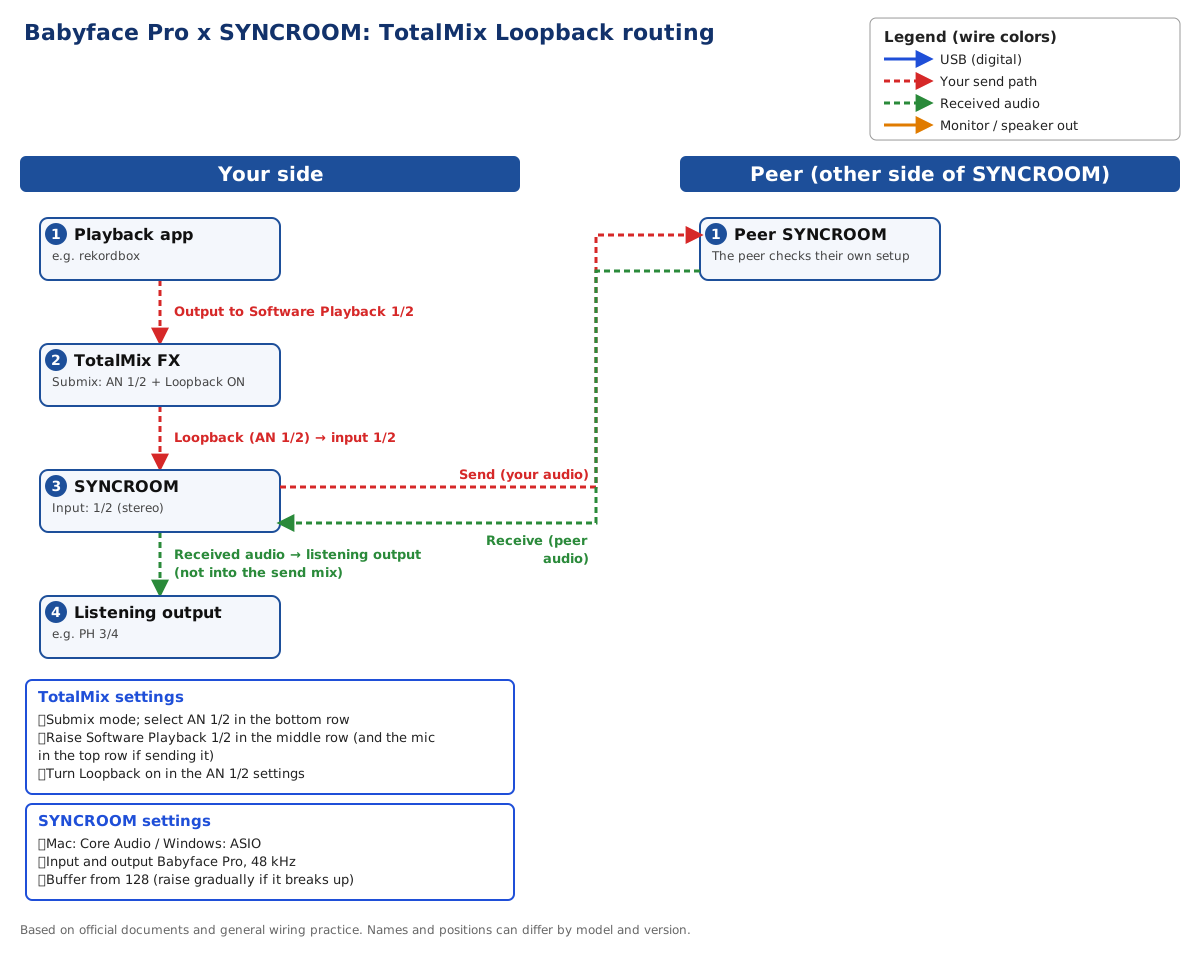
- Playback app → Software Playback 1/2
- TotalMix Submix (AN 1/2) + Loopback
- SYNCROOM Input 1/2 → peer
Steps
- Connect the Babyface Pro by USB and install the official RME driver and TotalMix FX. Mac and Windows both use the RME driver.
- In SYNCROOM Settings > Audio choose Core Audio on a Mac or ASIO on Windows, and use the Babyface Pro for input and output. Set 48 kHz and set the same on the Babyface Pro. Start the buffer at 128 (the official guide is 64-128) and raise it step by step if the sound breaks up.
- Send the playback app (rekordbox and so on) to the Babyface Pro Software Playback 1/2 (AN 1/2).
- Put TotalMix FX in Submix mode and select AN 1/2 in the bottom row. Raise Software Playback 1/2 in the middle row. To send your mic too, raise the mic input in the top row.
- Open the settings of AN 1/2 in the bottom row and turn Loopback on. Select input 1/2 in SYNCROOM. Use the stereo setting to send stereo.
- Use the output with Loopback as the send output. Listen on another output (for example PH 3/4) and set the SYNCROOM output to the one you listen on.
- Do not put what comes back from SYNCROOM (the Software Playback channel used for receiving) into the send mix. If you do, the other player hears themselves as echo or a ring.
- Check that the middle row of TotalMix moves and the SYNCROOM Input meter moves. While only the other player is sounding, your Input meter should not move.
The Input meter does not move
- In TotalMix check that the Submix selection is AN 1/2, Loopback is on and the faders are up.
- Check that the SYNCROOM input is 1/2. If it still points to a mic channel the playback does not arrive.
Echo or a ringing sound
- Check that the other player (the SYNCROOM receive channel) is not in the send mix. If it is, lower that fader.
- Check again that your listening output and your send output are separate.
If it is still not solved
Note the model, the OS and software versions, how far the meters moved and what you tried, then contact the manufacturer support. Do not assume a replacement or a fault before the cause is clear.
Official sources and scope
- RME: TotalMix FX Recording FX with Loopback
- Yamaha SYNCROOM 2 desktop manual
- RME Babyface Pro official page
Checked 2026-10-24. Details can differ by model and version, so also check the official documents.